Introduction: Why CRM for Small Business Matters
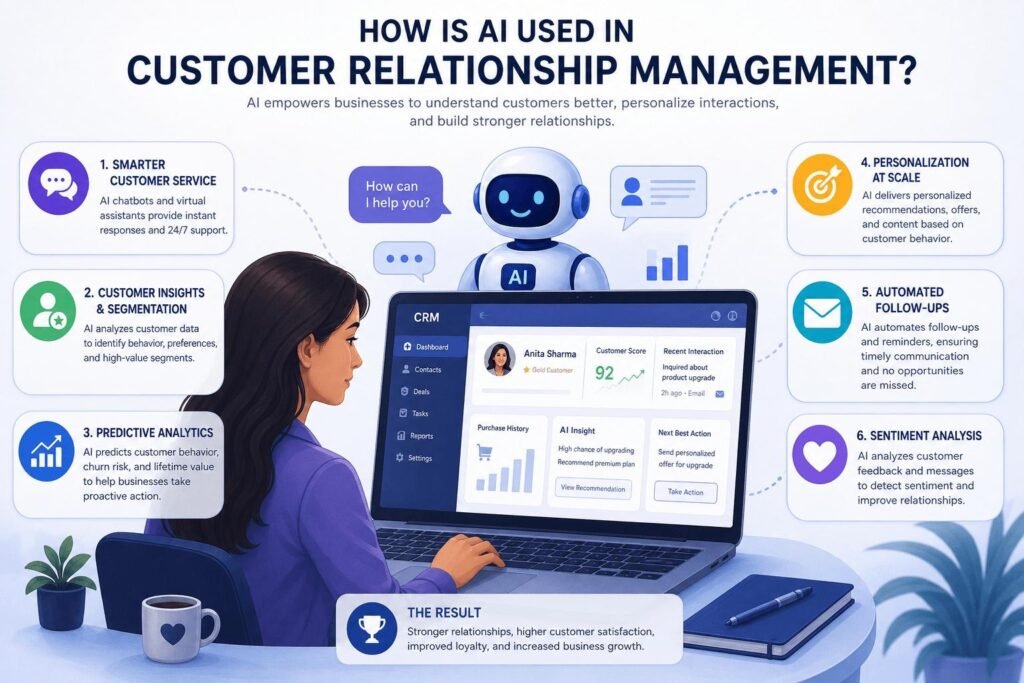
Running a small business often means handling multiple responsibilities at the same time. Business owners and teams have to generate leads, respond to enquiries, follow up with prospects, manage existing customers, send quotations, track sales and maintain long-term relationships. Without a structured system, important information can easily get lost. This is where CRM for small business becomes valuable.
A Customer Relationship Management system helps businesses organize customer information, track interactions, manage leads and improve sales processes from one central platform. Instead of keeping customer details across spreadsheets, notebooks, emails, messaging apps and different software, businesses can create a more organized workflow.
For small businesses, the objective is not simply to purchase another software solution. The real objective is to create a reliable system that helps the team save time, respond faster and build stronger customer relationships.
A properly implemented CRM for small business can help turn scattered customer data into actionable information. It can also support marketing automation, lead nurturing, sales tracking and customer retention.
Whether you operate a local service business, e-commerce company, consultancy, agency, healthcare practice, educational organization or growing startup, the right CRM strategy can make everyday operations more manageable.
What Is CRM for Small Business?
CRM for small business refers to Customer Relationship Management software and processes designed to help smaller organizations manage their relationships with prospects and customers.
A CRM system generally stores information such as:
- Customer names and contact details
- Lead sources
- Previous conversations
- Enquiry details
- Sales opportunities
- Follow-up dates
- Purchase history
- Customer preferences
- Email interactions
- Sales pipeline stages
- Notes and tasks
Instead of searching through multiple platforms to understand a customer’s history, a business can access relevant information from one centralized system.
For example, imagine that a customer fills out a website enquiry form. The lead can automatically enter the CRM. A salesperson can then contact the prospect, record the conversation, schedule a follow-up and move the lead through different sales stages.
This creates a more systematic process.
The biggest advantage of CRM for small business is that it gives businesses better visibility into their customer journey. Owners can understand which leads are active, which prospects require follow-up and which marketing activities are producing opportunities.
1. CRM for Small Business Improves Lead Management
Lead management is one of the biggest challenges faced by growing businesses. Leads can arrive through Google Ads, Meta Ads, websites, social media, WhatsApp, phone calls, email campaigns, referrals and offline marketing.
When these leads are managed manually, the chances of missed follow-ups increase.
A good CRM for small business can bring leads from different sources into a structured system. Each lead can be assigned a status, salesperson, priority and next action.
Common lead stages may include:
New Lead → Contacted → Qualified → Proposal Sent → Negotiation → Won/Lost
This simple pipeline can give the sales team a clear picture of where every prospect stands.
A CRM can also help identify leads that have not been contacted. Instead of relying on memory, sales representatives can receive tasks or reminders for follow-ups.
This becomes especially important as a business grows. Managing 20 leads manually may be possible, but managing hundreds of leads without a proper system can become difficult.
With CRM for small business, every enquiry can have a defined place in the sales process.
2. CRM for Small Business Strengthens Customer Relationships
Customers expect businesses to understand their needs and respond quickly. If a customer has already explained their requirements several times, repeating the same information can create frustration.
A CRM provides customer history that can help the team understand previous interactions.
For example, a customer profile may show:
- Previous enquiries
- Products or services purchased
- Previous complaints
- Communication history
- Follow-up records
- Preferences
- Important notes
This information allows employees to have more informed conversations.
The purpose of CRM for small business is not to make customer relationships robotic. Instead, it provides employees with the information required to make communication more personal and relevant.
For example, an agency can see which services a client previously purchased. A retailer can identify previous purchases. A service provider can check when a customer last requested assistance.
Better information can lead to better customer experiences.
3. CRM for Small Business Makes Follow-Ups More Reliable
One of the simplest ways to lose potential customers is to forget to follow up.
A prospect may say, “Call me next week,” but if the salesperson does not record the task, the follow-up can disappear among dozens of other responsibilities.
This is where CRM for small business can make a significant difference.
A CRM can allow sales teams to create reminders for:
- Calls
- Meetings
- Product demonstrations
- Quotations
- Renewals
- Payment reminders
- Customer check-ins
- Proposal follow-ups
Automated reminders reduce dependency on memory.
For example, after sending a quotation, a salesperson can schedule a follow-up for three days later. The CRM can remind the salesperson when action is required.
This creates consistency.
Businesses should remember that a CRM does not replace salespeople. It helps salespeople stay organized so that important opportunities receive attention at the right time.
4. CRM for Small Business Supports Sales Pipeline Management
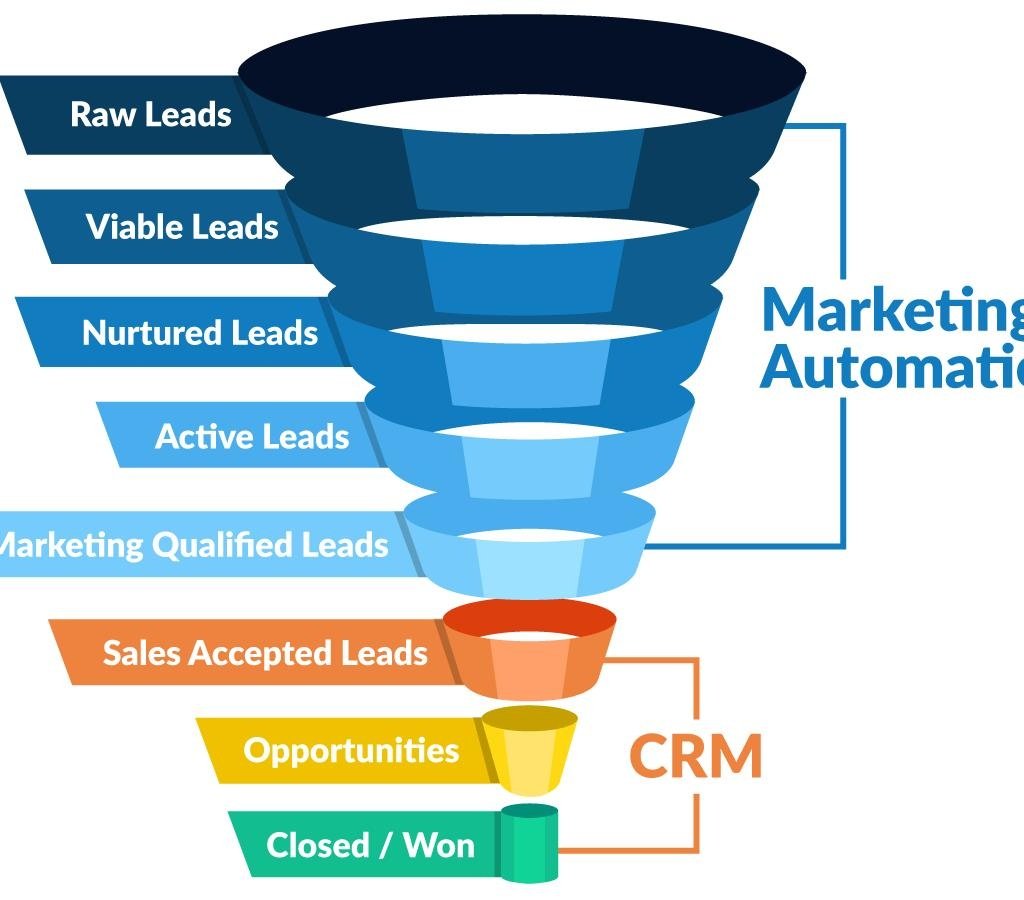
A sales pipeline helps a business understand how prospects move from initial enquiry to purchase.
Without a structured pipeline, business owners may know how many leads they received but may not know how many are actually close to becoming customers.
A CRM for small business can visualize the sales pipeline using stages.
For example:
100 New Leads
↓
60 Contacted
↓
35 Qualified
↓
20 Proposals
↓
10 Negotiations
↓
6 Customers
This type of information can help management identify where leads are dropping out.
If many prospects are contacted but very few reach the proposal stage, the qualification process may need improvement.
If many proposals are sent but few are converted, the business may need to review pricing, sales presentations, follow-up processes or customer objections.
A CRM therefore becomes more than a contact database. It becomes a sales management tool.
5. CRM for Small Business Automates Repetitive Tasks
Small teams often spend a significant amount of time performing repetitive administrative tasks.
Examples include:
- Sending enquiry confirmations
- Assigning leads
- Creating follow-up reminders
- Sending emails
- Updating lead statuses
- Sending payment reminders
- Sharing appointment confirmations
- Nurturing inactive leads
Many of these processes can be automated.
With CRM for small business, automation rules can be created based on customer actions.
For example, when a website visitor submits an enquiry, the CRM can automatically:
- Create a new lead.
- Record the source.
- Assign the lead to a salesperson.
- Send an acknowledgement email.
- Create a follow-up task.
- Add the lead to a nurturing sequence.
This reduces manual work and helps teams respond more consistently.
Automation can be particularly useful for businesses running digital marketing campaigns because large numbers of enquiries can enter the system within a short period.
6. CRM for Small Business Helps With Marketing Automation
Marketing and sales should not operate as completely separate functions.
Marketing generates awareness and leads, while sales converts qualified opportunities into customers. A CRM can connect these activities.
A CRM for small business can help businesses understand where leads originate.
For example, leads may come from:
- Google Ads
- Facebook Ads
- Organic Google searches
- Website forms
- Email campaigns
- Referrals
- Landing pages
When lead sources are tracked properly, businesses can compare marketing performance.
Suppose a company receives 100 leads from one campaign and 30 leads from another. Looking only at lead volume may suggest that the first campaign performed better.
However, CRM data might show that the first campaign generated only three customers while the second generated twelve.
That changes the decision.
CRM data can therefore help businesses focus on meaningful outcomes rather than vanity metrics.
7. CRM for Small Business Improves Lead Nurturing
Not every prospect is ready to purchase immediately.
Some customers need more information. Others may need time to compare competitors, arrange a budget or discuss the purchase internally.
A business that stops communicating after the first enquiry can lose valuable opportunities.
CRM for small business can support lead nurturing through scheduled communication and follow-up workflows.
For example:
Day 1: Enquiry confirmation
Day 3: Helpful information
Day 7: Product or service benefits
Day 14: Customer success story
Day 21: Follow-up communication
The exact sequence depends on the industry and customer journey.
Lead nurturing should not mean sending unnecessary messages repeatedly. The objective is to provide useful information while remaining relevant to the prospect.
A structured CRM makes it easier to identify prospects who need additional communication.
8. CRM for Small Business Saves Valuable Time
Time is one of the most important resources for a small business.
When employees spend hours searching for customer information, updating spreadsheets and manually creating reminders, less time remains for revenue-generating activities.
A CRM for small business can centralize information and automate selected processes.
Instead of maintaining separate documents for leads, customers, sales opportunities and follow-ups, teams can work from one system.
This can reduce repetitive administrative work.
For business owners, the time-saving benefit can be especially important. Instead of asking multiple employees for individual updates, management can view the sales pipeline and reports from the CRM.
The result can be a more organized working environment.
9. CRM for Small Business Improves Team Collaboration
As a business grows, multiple employees may interact with the same customer.
Without centralized information, communication can become fragmented.
For example, a salesperson may speak to a prospect on Monday, another employee may contact the same person on Tuesday and a manager may call again on Wednesday without knowing the previous conversations.
This can create a poor customer experience.
A CRM for small business allows authorized team members to access relevant customer information according to their roles.
Teams can record notes, update lead stages, assign tasks and monitor customer activity.
This helps create continuity.
CRM-based collaboration can be useful for:
- Sales teams
- Customer support teams
- Marketing teams
- Account managers
- Business owners
- Operations teams
The more people involved in customer communication, the more important centralized information becomes.
10. CRM for Small Business Provides Better Reporting
Business decisions should ideally be based on data rather than assumptions.
A CRM can generate reports that help management understand sales and customer activity.
Depending on the CRM platform and configuration, reports may cover:
- Total leads
- Qualified leads
- Conversion rates
- Sales by employee
- Revenue
- Lead sources
- Follow-up activity
- Lost opportunities
- Customer retention
- Campaign performance
A CRM for small business can make this information easier to analyze.
For example, if a business discovers that organic search generates fewer leads than paid advertising but produces a higher conversion rate, management can make more informed marketing decisions.
Reports can also identify sales representatives who need additional training or leads that are consistently being neglected.
Data becomes particularly powerful when it is reviewed regularly rather than simply collected.
11. CRM for Small Business Connects Digital Marketing Channels
Modern businesses rarely depend on one marketing channel.
A company may use SEO, Google Ads, Facebook, Instagram, YouTube, email marketing and WhatsApp simultaneously.
Managing these channels separately can make it difficult to understand the complete customer journey.
A CRM for small business can act as a central point for customer and lead information while connecting with different marketing tools.
For example:
Google Search → Website → Enquiry Form → CRM → Sales Follow-Up → Customer
Another journey might be:
Instagram Ad → Landing Page → CRM → WhatsApp Communication → Sales → Customer
Understanding these journeys can help businesses identify which channels contribute to actual business outcomes.
CRM integration can therefore complement broader digital marketing strategies.
12. CRM for Small Business Can Integrate With WhatsApp
WhatsApp has become an important communication channel for many businesses.
Customers often prefer messaging because it can be quicker and more convenient than email or phone calls.
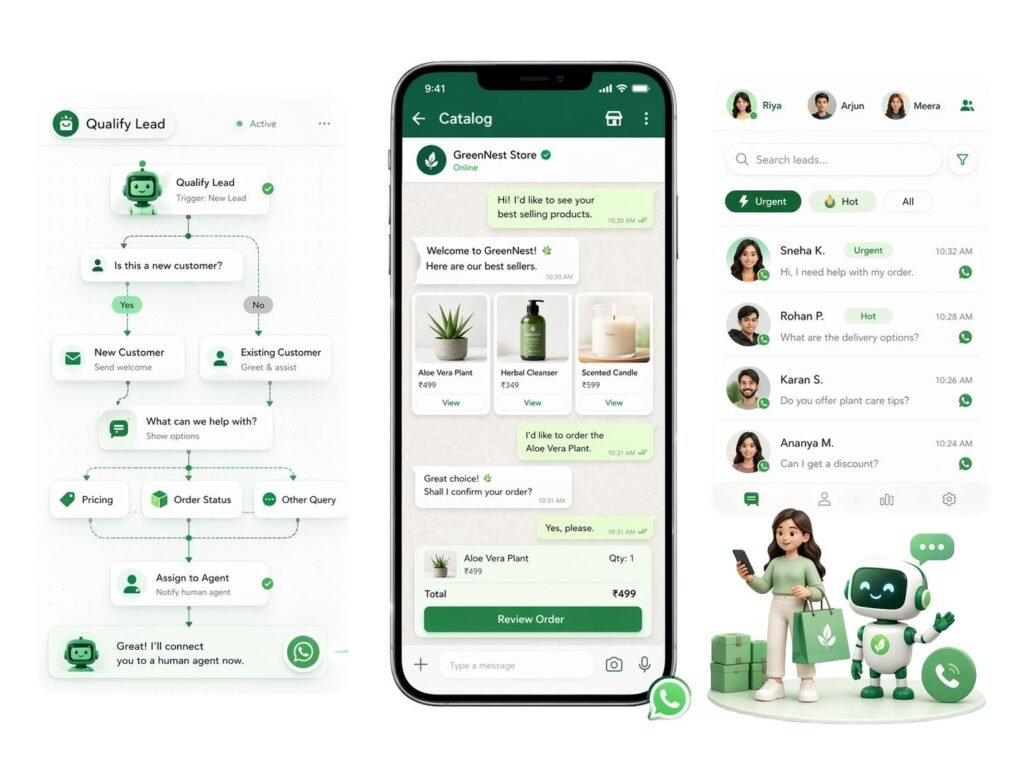
A CRM integrated with WhatsApp can help businesses organize customer communication and follow-ups, depending on the available integrations and platform capabilities.
Potential applications include:
- Enquiry notifications
- Appointment reminders
- Customer updates
- Lead follow-ups
- Promotional communication
- Support conversations
- Automated responses
For businesses already using WhatsApp marketing, CRM integration can make the communication process more structured.
However, businesses should use automation responsibly and respect customer consent, privacy requirements and applicable communication regulations.
The goal of CRM for small business should always be to improve customer communication rather than overwhelm customers with automated messages.
13. CRM for Small Business Supports Customer Retention
Acquiring a new customer can require significant marketing and sales effort. Therefore, retaining existing customers is an important part of sustainable growth.
A CRM can help businesses stay connected with customers after the initial purchase.
Businesses can use CRM data to create reminders for:
- Renewals
- Maintenance
- Repeat purchases
- Service schedules
- Customer feedback
- Loyalty communication
- Follow-up calls
A CRM for small business can help transform one-time transactions into ongoing relationships.
For example, a service company could schedule a follow-up several months after completing a project. An e-commerce business could send relevant recommendations based on customer activity. A consultancy could create renewal reminders.
Retention strategies should be based on customer needs rather than sending generic promotional messages.
14. CRM for Small Business Helps Measure ROI
One of the most important questions for any business is:
“Which activities are actually generating revenue?”
Marketing platforms provide useful metrics, but businesses also need to connect leads with sales outcomes.
A CRM for small business can help connect lead information with sales data.
For example:
Marketing Spend → Leads → Qualified Leads → Sales → Revenue
This creates a clearer picture of return on investment.
A business can compare campaigns, channels and customer segments to understand which activities generate better results.
This information can support decisions about where future marketing budgets should be allocated.
How to Choose CRM for Small Business
Choosing software should begin with business requirements rather than features alone.
Before selecting a CRM, consider:
Business Size
Choose a solution that matches the size of your team and customer database. A very complicated platform may create unnecessary complexity for a small organization.
Required Features
Identify essential functions such as:
- Contact management
- Lead management
- Sales pipeline
- Follow-up reminders
- Email automation
- Reporting
- WhatsApp integration
- Website integration
- Marketing automation
Ease of Use
A CRM is only useful if employees actually use it. A complicated interface can reduce adoption.
Integration
Check whether the CRM integrates with the tools your business already uses, including websites, email platforms, advertising systems, communication platforms and analytics tools.
Scalability
The CRM should be capable of supporting your business as the customer database and team grow.
Cost
Consider both subscription costs and implementation expenses. The cheapest CRM is not always the most economical choice if it cannot support important business requirements.
Common CRM Mistakes Small Businesses Should Avoid
Implementing a CRM does not automatically guarantee better sales.
Several common mistakes can reduce its effectiveness.
Choosing Too Many Features
Businesses sometimes purchase software with hundreds of features that they never use.
Start with the functions that solve actual business problems.
Poor Data Management
Incorrect, duplicate or incomplete customer information can make CRM reports unreliable.
Establish basic data-entry standards.
Not Training Employees
Employees need to understand how and why the CRM should be used.
Ignoring Follow-Up Processes
A CRM can provide reminders, but the business still needs a defined sales process.
Failing to Review Reports
Data becomes useful when management regularly reviews it and takes action.
Over-Automating Communication
Automation should support human communication, not eliminate it where personal interaction is important.
CRM and Digital Marketing: A Stronger Growth Combination
CRM becomes even more powerful when combined with digital marketing.
For example, SEO can generate organic traffic, paid advertising can generate targeted enquiries, social media can build awareness and content marketing can educate potential customers.
CRM then helps organize and nurture the leads generated through these activities.
This creates a broader marketing and sales ecosystem:
Traffic → Lead → CRM → Follow-Up → Conversion → Retention → Repeat Business
For businesses investing in SEO, Google Business Profile optimization, Meta Ads, Google Ads, social media marketing and lead generation, CRM can provide the operational layer required to manage incoming opportunities.
This is especially useful when lead volume increases.
CRM for Small Business: The Role of Automation
Automation can help businesses move from reactive customer management to proactive engagement.
A well-designed workflow might look like this:
Step 1: Customer submits an enquiry.
Step 2: CRM creates the lead.
Step 3: Lead source is recorded.
Step 4: Salesperson receives notification.
Step 5: Customer receives acknowledgement.
Step 6: Follow-up task is created.
Step 7: Salesperson contacts the customer.
Step 8: Lead stage is updated.
Step 9: Unresponsive leads enter a nurturing workflow.
Step 10: Converted customers move into retention campaigns.
This type of workflow reduces manual coordination.
For businesses that receive leads from multiple online channels, automation can make the difference between simply generating enquiries and systematically converting them.
CRM for Small Business: When Should You Implement One?
There is no universal number of employees or customers that determines when a business needs CRM software.
A small business may benefit from CRM even with a relatively small team if it regularly manages leads and customer interactions.
Signs that your business may need a CRM include:
- Leads are being missed.
- Follow-ups are forgotten.
- Customer information is scattered.
- Employees maintain separate spreadsheets.
- Management cannot easily see sales performance.
- Marketing leads are not tracked properly.
- Customers receive inconsistent communication.
- Sales opportunities are difficult to prioritize.
- Manual reporting takes too much time.
- Your business is growing rapidly.
If several of these problems exist, implementing CRM for small business may be worth considering.
How Digital Marketing India Can Help With CRM
For businesses that want to combine CRM with digital marketing, automation and lead generation, professional implementation can help create a more connected system.
Saurabh Kumar, with 15+ years of experience in digital marketing, provides digital marketing and technology-related services through Digital Marketing India.

Services include:
- Website and app development
- Business website development
- E-commerce website development
- Custom web applications
- Mobile app development
- Landing page development
- Website maintenance and support
- Local SEO
- On-page SEO
- Off-page SEO
- Technical SEO
- E-commerce SEO
- Google Business Profile optimization
- SEO audits and competitor analysis
- Facebook and Instagram marketing
- LinkedIn and YouTube marketing
- Social media management
- Content creation and strategy
- Google Ads
- Meta Ads
- YouTube Ads
- LinkedIn Ads
- Remarketing campaigns
- Lead generation campaigns
- WhatsApp marketing
- Bulk SMS marketing
- IVR and promotional calls
- WhatsApp chatbot development
- AI chatbot development
- Website live chat integration
- Marketing automation
- CRM integration
- Email marketing automation
- Lead nurturing automation
- Graphic design
- Video editing
- Motion graphics
- Content marketing
- Analytics and reporting
- Online reputation management
The combination of digital marketing, CRM integration and automation can help businesses build a more connected customer acquisition system.
Final Thoughts on CRM for Small Business
A CRM should not be viewed simply as a software subscription. It is a structured approach to managing leads, customers, communication and sales opportunities.
The right CRM for small business can help businesses organize customer information, improve follow-ups, automate repetitive tasks, strengthen team collaboration, monitor sales pipelines and understand marketing performance.
However, technology alone does not create results. Businesses need clear processes, accurate data, employee adoption and regular performance reviews.
When CRM is combined with SEO, paid advertising, social media, website development, WhatsApp communication, marketing automation and analytics, it can become a central part of a modern business growth strategy.
For a growing company, the objective is simple: capture every opportunity, follow up consistently, understand every customer and make better decisions using data.
That is where an effective CRM strategy can create long-term value.
About Saurabh Kumar
Saurabh Kumar is a digital marketing professional with 15+ years of experience in Digital Marketing.
Through Digital Marketing India, he provides solutions covering website and app development, SEO, social media marketing, paid advertising, automation, CRM integration, creative services, video production, content marketing, analytics and online reputation management.
Official Address:
S15-00709, Vaidehi Niwas, Bhairomunna Link Road
Sahnewal, Ludhiana, Punjab – 141120
Contact: +91 76966 77728
Businesses looking to improve their digital presence, lead management, marketing automation or customer acquisition process can explore an integrated approach combining digital marketing with CRM and automation.