
Introduction
In today’s competitive business environment, communicating with customers quickly and effectively is essential for building trust, generating leads and increasing sales. Customers expect businesses to provide timely responses, useful information and convenient communication channels. Traditional communication methods such as emails and phone calls still have their importance, but instant messaging has become an increasingly popular way for people to interact with brands. This is where the WhatsApp Business API becomes an important solution for modern businesses.
WhatsApp has become a familiar communication platform for millions of people. With the WhatsApp Business API, businesses can answer customer enquiries, share product information, send order updates, provide support and develop stronger customer relationships. The WhatsApp Business API also offers advanced communication capabilities for companies managing a large number of customer conversations.
The WhatsApp Business API allows businesses to integrate messaging into their existing systems. Through the WhatsApp Business API, organisations can introduce automation, team-based communication, customer relationship management and streamlined business processes.
Whether a company operates an e-commerce store, educational institution, healthcare practice, real estate agency, travel business or service-based organisation, the WhatsApp Business API can make communication more organised and efficient. The WhatsApp Business API supports automated customer interactions, while the WhatsApp Business API can also help businesses manage enquiries and improve response processes.
For growing companies, the WhatsApp Business API provides opportunities to connect different communication channels. By integrating the WhatsApp Business API with CRM software, businesses can organise customer information and manage potential leads more effectively. The WhatsApp Business API can also support marketing automation and customer engagement strategies.
Digital Marketing India, led by Saurabh Kumar, provides digital marketing, WhatsApp marketing, chatbot development and automation solutions. Businesses can explore the WhatsApp Business API to improve their communication strategies, while the WhatsApp Business API can become an important part of their digital marketing activities. With suitable implementation, the WhatsApp Business API helps organisations build more structured customer communication systems.
1. What Is WhatsApp Business API?
The WhatsApp Business API is a business messaging solution designed for medium-sized and large organisations that want to communicate with customers at scale. It allows businesses to connect WhatsApp messaging with software platforms, customer relationship management systems, automation tools and other business applications.
Unlike a personal WhatsApp account, the API is designed to support structured business communication. It enables companies to manage customer conversations through integrated platforms rather than depending on one individual mobile device.
For example, an online shopping company may receive hundreds of customer enquiries every day. Managing every conversation manually can become difficult, particularly when customers ask similar questions about product availability, delivery charges, payment methods and return policies.
With an appropriately configured WhatsApp Business API solution, businesses can automate frequently asked questions, route conversations to customer support representatives and send approved notifications.
Some important capabilities include:
- Automated customer notifications.
- Business-initiated messaging using approved templates.
- Customer support conversations.
- Integration with CRM software.
- Automated responses and chatbot workflows.
- Product and service enquiries.
- Order and delivery notifications.
- Lead management and follow-ups.
- Team-based conversation management.
- Integration with other business applications.
The platform helps businesses create a more organised communication process while maintaining a familiar messaging experience for customers.
2. Why WhatsApp Business API Is Important for Modern Businesses
Customer expectations have changed significantly. People increasingly prefer convenient communication channels where they can ask questions and receive information without navigating complicated websites or waiting for long email responses.
Businesses that fail to respond promptly may lose potential customers to competitors offering better communication experiences.
The WhatsApp Business API can help organisations address this challenge by bringing customer conversations into a structured digital communication system.
Its importance can be understood through several business benefits.
Faster communication: Automated responses can acknowledge customer enquiries and provide useful information even when employees are unavailable.
Improved customer experience: Customers can receive order updates, appointment reminders and service information through a familiar messaging platform.
Better lead management: Businesses can organise enquiries, assign conversations and follow up with potential customers.
Reduced repetitive work: Chatbots can handle frequently asked questions, allowing employees to focus on more complicated requests.
Centralised communication: Multiple team members can manage conversations through a connected business platform, depending on the chosen solution.
Scalable messaging: Organisations can build communication workflows that support increasing customer interaction volumes.
For businesses aiming to improve their digital presence, combining WhatsApp communication with SEO, paid advertising and CRM integration can create a more connected customer acquisition strategy.
3. WhatsApp Business API vs WhatsApp Business App
Many business owners are confused about the difference between the WhatsApp Business App and the WhatsApp Business API. Although both are designed for business communication, they serve different requirements.
The WhatsApp Business App is suitable for small businesses that manage a relatively limited number of customer conversations. It provides features such as business profiles, product catalogues, quick replies, labels and basic automated greetings.
The API-based platform is designed for businesses that require more advanced communication and integration capabilities.
| Feature | WhatsApp Business App | WhatsApp Business API |
|---|---|---|
| Intended users | Small businesses | Growing and larger businesses |
| Communication | App-based | Software-integrated |
| Automation | Basic tools | Advanced automation through integrations |
| Chatbots | Limited native capabilities | Supports integrated chatbot solutions |
| CRM integration | Limited | Supports custom and third-party integrations |
| Team management | Limited app-based access | Platform-dependent team management |
| Notifications | Basic business messaging | Approved message templates |
| Custom workflows | Limited | More flexible through integrations |
| Reporting | Basic | Depends on the connected platform |
The API does not provide a standalone inbox by itself. Businesses generally need a suitable business messaging platform, integration provider or custom application to manage conversations.
The right choice depends on the organisation’s size, communication requirements, budget and expected messaging volume.
4. How WhatsApp Business API Helps Generate More Business Leads
Lead generation is one of the most important objectives of digital marketing. Businesses invest in Google Ads, Meta Ads, SEO, social media and other promotional activities to attract potential customers.
However, generating enquiries is only the first step. Companies must also respond quickly, understand customer requirements and maintain consistent follow-ups.
The WhatsApp Business API can support this process by connecting advertising campaigns and website enquiries with automated messaging workflows.
For example, a real estate company running Facebook and Instagram advertisements can encourage interested people to start a WhatsApp conversation. When a customer clicks the advertisement, the business can receive the enquiry through its connected messaging system.
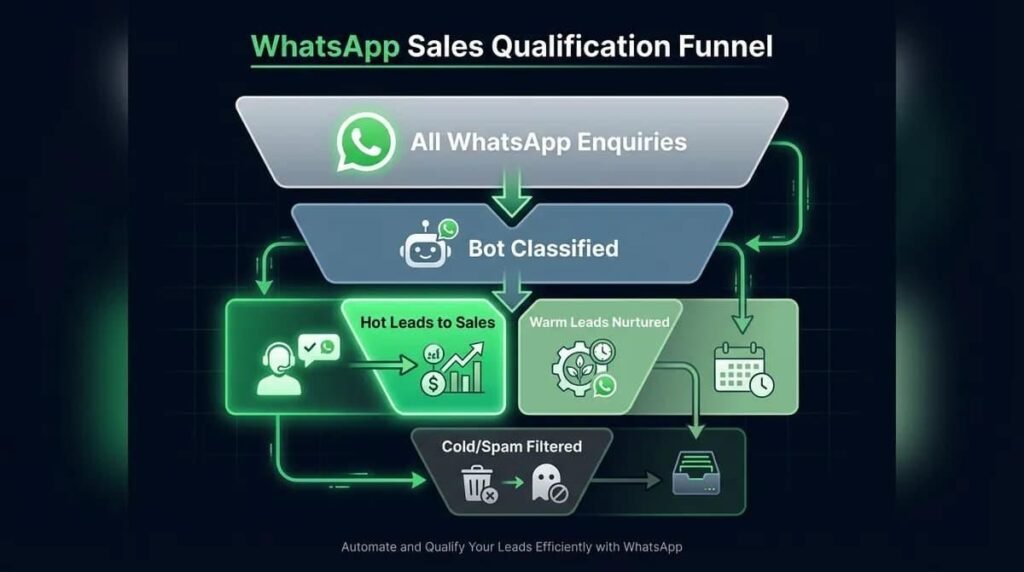
An automated workflow may then:
- Welcome the potential customer.
- Ask about the preferred property location.
- Collect the approximate budget.
- Identify the required property type.
- Share relevant project information.
- Forward qualified enquiries to the sales team.
- Schedule an appropriate follow-up.
Similar workflows can be developed for educational institutions, clinics, gyms, consultants, travel agencies and other service providers.
Businesses should obtain appropriate customer consent before sending promotional communications and should respect customer preferences.
When connected with lead generation campaigns and CRM software, WhatsApp messaging can help organisations maintain a more systematic approach to managing enquiries.
5. WhatsApp Business API for Automated Customer Support
Customer support plays an important role in customer satisfaction and long-term brand relationships. However, businesses frequently receive repetitive enquiries that require similar responses.
Questions about business hours, pricing, appointment availability, delivery status, payment options and service details can consume a significant amount of employees’ time.
An integrated WhatsApp chatbot can provide automated responses to frequently asked questions.
For instance, a healthcare clinic may configure a chatbot to provide general information about consultation timings, clinic location, appointment procedures and contact details.
Similarly, an e-commerce business can create automated support options for order tracking, return policies, payment confirmation and product information.
Some useful customer support automation features include:
- Welcome messages.
- Frequently asked questions.
- Automated menu options.
- Customer enquiry classification.
- Support request registration.
- Order status notifications.
- Appointment reminders.
- Conversation transfer to human agents.
Automation should not replace human assistance entirely. Customers should have a clear way to contact a representative when their requirements cannot be addressed through automated responses.
A well-designed communication workflow combines chatbot efficiency with human support to deliver a more convenient customer experience.
6. WhatsApp Business API for E-Commerce Businesses
E-commerce businesses operate in a competitive environment where customer experience can influence purchasing decisions. Shoppers frequently need additional information before placing an order.
They may ask about product specifications, available sizes, delivery timelines, payment options, discounts and return policies.
The WhatsApp Business API can help online retailers communicate with customers throughout different stages of the buying journey.
Product enquiries: Businesses can respond to customer questions and share relevant product information.
Order confirmation: Customers can receive confirmation messages after completing a purchase.
Shipping notifications: Automated updates can inform customers about order dispatch and delivery progress.
Abandoned cart communication: Businesses may use eligible, consent-based messaging workflows to remind customers about incomplete purchases.
After-sales support: Customers can request assistance with returns, exchanges, warranties and other service-related matters.
Promotional campaigns: Businesses can share relevant offers through approved marketing templates with customers who have provided the required consent.
For example, an online clothing store can use WhatsApp to send an order confirmation after a purchase and provide shipping updates as the order moves through the delivery process.
Such communication can reduce uncertainty and make the shopping experience more convenient.
7. WhatsApp Business API for Appointment Booking and Reminders
Appointment-based businesses often face communication challenges related to scheduling, cancellations and missed appointments.
Clinics, salons, fitness centres, consultants, educational institutions and service providers can use WhatsApp automation to organise customer communication.
A connected booking workflow may allow customers to:
- Request an appointment.
- Select an available service.
- Receive booking confirmation.
- Get appointment reminders.
- Request rescheduling.
- Receive location and preparation instructions.
- Contact the business for additional assistance.
For example, a dental clinic can configure a messaging system that sends appointment confirmation after a booking is registered. It may also send an appropriate reminder before the scheduled consultation.
A fitness centre can use similar workflows to share class schedules, membership information and session reminders.
These features can help businesses maintain consistent communication while reducing repetitive administrative tasks.
However, automated reminders should follow customer consent requirements and applicable messaging policies. Sensitive personal information should also be handled carefully.
8. WhatsApp Business API and CRM Integration
Customer relationship management is essential for businesses that handle enquiries from different marketing channels.
Without a proper management system, important customer details may become scattered across spreadsheets, emails, individual phones and messaging applications.
CRM integration helps businesses bring customer information and communication history into a more organised environment.
When WhatsApp messaging is connected with a CRM platform, businesses may be able to:
- Record new customer enquiries.
- Maintain customer contact information.
- Track conversation history.
- Assign leads to sales representatives.
- Categorise enquiries according to requirements.
- Schedule follow-up activities.
- Monitor lead progress.
- Analyse communication performance.
Consider a digital marketing agency receiving enquiries through Google Ads, website forms, Instagram and WhatsApp.
A connected CRM system can help the sales team manage these enquiries through a centralised process. Employees can identify which leads require immediate attention and which customers need additional information.
This approach can improve internal coordination and reduce the chances of missed follow-ups.
The exact capabilities depend on the CRM software, WhatsApp integration method and automation platform selected by the business.
9. WhatsApp Business API for Marketing Campaigns
Digital marketing involves reaching the right audience through suitable communication channels. WhatsApp can become an important part of a broader marketing strategy when used responsibly.
Businesses can use approved WhatsApp message templates to communicate relevant updates, offers and information to customers who have opted in to receive such messages.
Some possible campaign applications include:
Product launches: Inform interested customers when new products or services become available.
Seasonal offers: Share relevant festive promotions and limited-period discounts.
Event invitations: Send information about webinars, workshops, exhibitions and business events.
Educational updates: Share useful information about courses, admission procedures and training programmes.
Customer retention: Communicate relevant updates to existing customers and encourage continued engagement.
Service notifications: Provide information about bookings, orders and other customer transactions.
Successful messaging campaigns should focus on relevance rather than sending excessive promotional messages.
Businesses should clearly identify themselves, communicate the purpose of their messages and provide appropriate opt-out options.
The goal should be to develop meaningful customer relationships rather than simply increase message volume.
10. WhatsApp Business API and AI Chatbot Development
Artificial intelligence is creating new opportunities for businesses to automate customer communication.
AI-powered chatbots can be integrated with WhatsApp messaging systems to understand customer questions and provide more flexible responses than traditional fixed-menu bots.
For example, a customer may ask a travel agency about holiday packages for a family trip. An AI-enabled chatbot could collect details such as the preferred destination, travel dates, number of travellers and approximate budget before directing the enquiry to a travel consultant.
Similarly, an educational institution may use a chatbot to answer general questions about courses, admission procedures and application deadlines.
AI chatbot integration can support:
- Natural-language customer interactions.
- Automated lead qualification.
- Frequently asked questions.
- Service recommendations.
- Customer enquiry categorisation.
- Integration with business databases.
- Conversation summaries.
- Human-agent handover.
However, AI-generated responses should be configured carefully. Businesses should ensure that the chatbot provides accurate information and does not make unsupported promises.
Important decisions, complaints, sensitive requests and complicated customer issues should be transferred to qualified human representatives.
11. WhatsApp Business API for Small and Medium-Sized Businesses
Small and medium-sized businesses often operate with limited employees and marketing resources. Managing customer enquiries manually can become difficult as the business grows.
The WhatsApp Business API can provide an opportunity to introduce structured communication without depending entirely on individual employees.
Different industries can use it in different ways.
Healthcare: Clinics can manage appointment requests, general enquiries and approved reminders.
Education: Schools and coaching institutes can communicate admission updates, course information and important announcements.
Real estate: Property consultants can collect buyer requirements and organise project enquiries.
Retail: Shops can answer product questions and share order-related notifications.
Hospitality: Hotels and travel agencies can communicate booking details and service information.
Professional services: Consultants, agencies and service providers can manage incoming leads and client follow-ups.
The most suitable implementation depends on the number of enquiries, business objectives and available technology.
A small company does not necessarily need a complicated automation system from the beginning. It can start with a few useful workflows and expand them as customer communication requirements increase.

12. Important WhatsApp Business API Features Businesses Should Understand
Before implementing the platform, businesses should understand its major messaging capabilities and operational requirements.
Message templates: Businesses generally need approved templates for business-initiated conversations outside the customer service window. Templates may be categorised according to their purpose, such as marketing, utility or authentication.
Customer service window: When a customer sends a message, a customer service window opens during which the business can respond using permitted free-form messages. The standard window is 24 hours from the customer’s most recent message.
Webhooks: Webhooks allow connected applications to receive real-time event notifications, such as incoming messages and message delivery updates.
Cloud API: Meta provides a Cloud API option that allows businesses to integrate WhatsApp messaging into their applications without independently hosting the underlying API infrastructure.
Interactive messages: Depending on the supported message format, businesses can use buttons, lists and other interactive elements to make conversations easier.
Media sharing: Supported messaging formats allow businesses to exchange content such as images, documents, audio and videos.
Multiple integrations: The API can connect with suitable CRM systems, customer support platforms, e-commerce applications and custom-developed software.
These capabilities can make business communication more organised, but implementation must follow Meta’s current technical documentation and messaging policies.
13. WhatsApp Business API Pricing: What Businesses Should Know
Pricing is an important consideration when selecting a WhatsApp business messaging solution.
Businesses should understand that the total implementation cost may include more than one component.
Common cost considerations include:
- Meta messaging charges, where applicable.
- Business solution provider fees, if using a provider.
- Software subscription charges.
- Chatbot development costs.
- CRM integration charges.
- Custom application development.
- Maintenance and technical support.
Meta’s WhatsApp Business Platform pricing structure is based on applicable message categories and market-specific rates. The actual amount can depend on the recipient’s country, message category and applicable pricing rules.
Utility messages sent within an active customer service window may receive different pricing treatment from business-initiated messages. Service conversations and other message types should be evaluated according to the latest official pricing rules.
Businesses should also understand the difference between the API itself and the software platform used to manage it.
A provider may charge for an inbox, automation tools, additional team members, integrations or other services.
Therefore, companies should compare the complete solution rather than choosing an option based only on its advertised monthly price.
Before purchasing a WhatsApp automation service, request a clear breakdown of setup costs, recurring charges, messaging expenses and support arrangements.
14. WhatsApp Business API Setup: How the Integration Process Works
Setting up a WhatsApp messaging solution requires technical configuration and business verification steps.
Although the exact process can vary depending on the selected integration method, the general implementation process includes the following stages.
Step 1: Define business requirements
Identify the purpose of using WhatsApp. Determine whether the main objective is lead generation, customer support, order updates, appointment booking or marketing automation.
Step 2: Prepare the business information
Collect the required business details, including relevant account information, business website and phone number.
Step 3: Configure Meta business assets
Set up the required Meta business portfolio and WhatsApp Business Account through the supported onboarding process.
Step 4: Complete required verification
Complete the applicable business verification and
Step 5: Select an integration method
Choose the Cloud API, an appropriate business solution provider or a suitable custom integration approach.
Step 6: Configure messaging templates
Create message templates for the intended business communication purposes and submit them for approval where required.
Step 7: Connect CRM and automation tools
Integrate the messaging system with the company’s CRM, website, customer support software or other applications.
Step 8: Test the communication workflow
Test incoming messages, automated responses, notifications, customer support transfers and delivery updates.
Step 9: Launch and monitor
Begin using the system and regularly monitor message delivery, customer feedback, template performance and operational efficiency.
A properly planned setup can help prevent unnecessary technical complications and provide a more consistent customer communication experience.
15. WhatsApp Business API Rules and Best Practices
Using WhatsApp for business communication requires following platform policies and respecting customer expectations.
Businesses should avoid treating the platform as an unrestricted bulk messaging tool.
Some important practices include:
Obtain customer opt-in: Businesses should obtain the appropriate permission before sending proactive business messages. Customers should understand what kind of communication they are agreeing to receive.
Use approved templates: Business-initiated messages outside the customer service window generally require approved templates.
Respect opt-out requests: If a customer asks to stop receiving promotional messages, the business should honour that request.
Maintain message relevance: Send information that is useful and appropriate for the recipient.
Avoid excessive messaging: Repeated, irrelevant or unwanted messages can negatively affect customer experience and business messaging quality.
Provide human support: Customers should be able to reach a human representative when automation cannot resolve their concerns.
Protect customer information: Businesses should implement suitable security practices and handle personal information responsibly.
Monitor quality ratings: Regularly review account quality, messaging performance and customer feedback.
Following these practices can help businesses develop a more sustainable communication strategy.
16. How WhatsApp Business API Supports Overall Digital Marketing
WhatsApp messaging works best when it is connected with a broader digital marketing strategy.
Businesses often invest in different online channels, but the results may remain limited when customer enquiries are not managed effectively.
For example, SEO can help a website appear in relevant search results. Google Ads can attract people actively looking for a service. Meta Ads can introduce products and services to relevant audiences. Social media marketing can increase brand awareness.
WhatsApp can support the next stage by providing a convenient channel for customers to ask questions and receive business information.
A connected digital marketing strategy may work like this:
- A potential customer discovers a business through Google search.
- The customer visits the website.
- A WhatsApp enquiry option encourages direct communication.
- An automated response acknowledges the enquiry.
- A chatbot collects basic requirements.
- The enquiry is recorded in a CRM.
- A sales representative contacts the qualified lead.
- Further communication is managed through appropriate follow-ups.
This creates a more connected customer journey.
Digital Marketing India offers services that can support different stages of this process, including SEO, Google Business Profile optimisation, website development, Meta advertising, WhatsApp marketing, chatbot development and CRM integration.
Businesses can select individual services or combine them according to their marketing objectives.
17. Common Mistakes to Avoid When Using WhatsApp Business API
Although WhatsApp automation offers several advantages, poor implementation can create communication problems.
Businesses should avoid the following mistakes.
Sending messages without proper consent: Promotional communication should follow applicable opt-in requirements.
Using automation for every situation: Some customer enquiries require personal attention and professional assistance.
Ignoring message templates: Businesses should understand template approval and messaging restrictions before launching campaigns.
Choosing an unsuitable provider: A solution should be selected according to business requirements, integration needs and support quality.
Ignoring customer responses: Automation should not prevent customers from receiving timely human assistance.
Not tracking performance: Businesses should monitor delivery, customer responses, lead quality and conversions.
Creating complicated chatbot menus: A chatbot should make communication easier rather than forcing customers through unnecessary steps.
Failing to maintain customer data: CRM and contact records should be organised and updated regularly.
Avoiding these issues can help organisations develop a more effective messaging strategy.
18. How to Choose the Right WhatsApp Business API Service Provider
Selecting the right implementation partner is an important decision for businesses planning to introduce WhatsApp automation.
A suitable provider should understand both the technical and marketing aspects of business communication.
Before selecting a service provider, consider the following factors:
- Experience with WhatsApp Business Platform integrations.
- Understanding of Meta’s business messaging policies.
- Availability of chatbot development.
- CRM and third-party software integration capabilities.
- Custom workflow development.
- Technical support and maintenance.
- Transparent pricing.
- Data protection and security practices.
- Reporting and performance monitoring.
- Ability to scale as the business grows.
Businesses should also clarify whether the provider offers official onboarding, a supported software platform or custom development services.
Do not select a solution only because it promises unlimited messaging or guaranteed sales. Messaging limits, pricing, quality requirements and other platform rules apply.
A reliable implementation partner should explain the available options clearly and recommend a solution that matches the organisation’s actual requirements.
19. Why Choose Digital Marketing India for WhatsApp Marketing and Automation?
Implementing an effective messaging system requires more than connecting a phone number to software. Businesses need a strategy that considers customer acquisition, lead management, automation, integration and long-term communication goals.
Digital Marketing India provides digital marketing and technology-related services to help businesses improve their online presence and customer communication.
Under the guidance of Saurabh Kumar, who has more than 15 years of experience in digital marketing, the organisation focuses on helping businesses explore suitable digital solutions.
Paid Advertising: Campaign management for Google Ads, Facebook, Instagram, YouTube and LinkedIn.
Social Media Marketing: Content strategy, social media management and creative development.
By combining these services, businesses can create a more organised digital marketing ecosystem.
The objective is to help companies connect with potential customers, manage enquiries effectively and improve their overall digital communication processes.
20. Future of WhatsApp Business API in Digital Marketing
Business messaging is expected to remain an important part of the digital communication landscape.
As customers become more comfortable interacting with brands through messaging applications, organisations are exploring better ways to provide information, support and personalised experiences.
A service-based company may integrate its website, CRM and WhatsApp communication to improve lead management.
However, technology alone does not guarantee business growth. The results will depend on the relevance of the communication, the quality of customer service, the effectiveness of the business strategy and compliance with platform policies.
Businesses that focus on providing useful, timely and customer-friendly communication will be better positioned to benefit from messaging automation.
Conclusion
The WhatsApp Business API has become a useful communication solution for businesses that want to manage customer conversations, automate repetitive tasks and integrate messaging with their existing digital systems.
Digital Marketing India, led by Saurabh Kumar, provides WhatsApp marketing, chatbot development, AI automation, CRM integration and other digital marketing services to help businesses strengthen their online communication.
If your organisation wants to explore WhatsApp marketing or automate customer communication, you can connect with Digital Marketing India to discuss your requirements and identify a suitable solution.
Contact Digital Marketing India
Saurabh Kumar
15+ Years of Experience in Digital Marketing
Company: Digital Marketing India – Services
Address:
S15-00709, Vaidehi Niwas, Bhairomunna Link Road,
Sahnewal, Ludhiana, Punjab – 141120
Contact Number: +91 76966 77728
Explore Our Services:
- Website and App Development
- SEO and Local SEO
- Google Business Profile Optimisation
- Social Media Marketing
- Google and Meta Ads
- WhatsApp Marketing
- WhatsApp Chatbot Development
- AI Chatbot Development
- CRM Integration
- Marketing Automation
- Graphic Designing and Video Editing
- Content Marketing
- Online Reputation Management
Digital Marketing India – Helping Businesses Build a Stronger Digital Presence.