
If you’re searching for how to schedule a message in WhatsApp, you’re certainly not alone. Every day, millions of people look for reliable ways to automate their WhatsApp conversations and send messages at the perfect time. Whether it’s wishing a friend a happy birthday at midnight, sending anniversary greetings, reminding clients about appointments, following up with leads, notifying customers about new offers, or sharing festive greetings, knowing how to schedule a message in WhatsApp can make your communication much more efficient. Instead of relying on memory or setting multiple alarms, scheduling messages helps ensure that every important conversation reaches the recipient exactly when you intend.
Learning how to schedule a message in WhatsApp is especially beneficial for business owners, marketers, freelancers, teachers, healthcare professionals, and anyone who regularly communicates through WhatsApp. Timely messaging not only saves valuable time but also creates a more professional impression. Businesses can use scheduled messages for customer support, payment reminders, order confirmations, promotional campaigns, follow-ups, and appointment notifications, while individuals can use them for personal reminders and special occasions. As WhatsApp continues to be one of the world’s most popular messaging platforms, understanding how to schedule a message in WhatsApp has become an essential productivity skill.
Although the standard WhatsApp Messenger application does not currently include a built-in feature for message scheduling, there are several trusted methods available to accomplish this task. Android users can use scheduling apps, iPhone users can take advantage of Apple Shortcuts automation, and businesses can leverage the powerful WhatsApp Business API along with CRM integrations and marketing automation platforms. These solutions make how to schedule a message in WhatsApp easier than ever while helping users stay organized and maintain consistent communication.
In this comprehensive guide, you’ll discover everything you need to know about how to schedule a message in WhatsApp. We’ll explain the best methods for Android, iPhone, WhatsApp Business, and business automation tools with step-by-step instructions that are easy to follow. You’ll also learn the advantages of scheduled messaging, common mistakes to avoid, expert tips, practical business use cases, security considerations, and answers to the most frequently asked questions. By the end of this guide, you’ll have a complete understanding of how to schedule a message in WhatsApp and be able to choose the best solution based on your personal or business needs.
What Does It Mean to Schedule a Message in WhatsApp?
Learning how to schedule a message in WhatsApp means setting up a message today that will automatically be delivered at a specific future date and time.
Instead of manually sending a message, scheduling allows you to prepare it in advance.
Examples include:
- Birthday wishes
- Anniversary greetings
- Meeting reminders
- Payment reminders
- Festival wishes
- Customer follow-ups
- Promotional offers
- Appointment confirmations
- Daily notifications
- Team updates
Businesses especially benefit because scheduled messaging improves consistency and customer engagement.
Why Should You Learn How to Schedule a Message in WhatsApp?
Knowing how to schedule a message in WhatsApp offers several benefits for both personal and professional users.
Save Time
Prepare messages once and let automation send them later.
Never Forget Important Events
Schedule birthday wishes, anniversaries, and reminders well in advance.
Better Customer Communication
Businesses can remind customers about appointments, payments, and offers without manual effort.
Increase Productivity
Focus on important work instead of remembering when to send messages.
Professional Communication
Scheduled messages ensure timely communication with clients regardless of your availability.
Can You Schedule Messages Directly in WhatsApp?
One of the most common questions people ask while searching how to schedule a message in WhatsApp is whether WhatsApp offers this feature officially.
The answer depends on which version you’re using.
WhatsApp Messenger
No built-in scheduling feature.
WhatsApp Business
Limited scheduling through Meta Business tools and automation features.
Third-Party Apps
Several Android applications allow scheduled messaging.
iPhone
Apple Shortcuts provides a partial automation solution.
Method 1: How to Schedule a Message in WhatsApp Using SKEDit (Android)
One of the easiest ways to learn how to schedule a message in WhatsApp is by using SKEDit.
Step 1
Install SKEDit from Google Play Store.
Step 2
Create your account.
Step 3
Choose WhatsApp.
Step 4
Select the recipient.
Step 5
Type your message.
Step 6
Choose date and time.
Step 7
Enable required permissions.
Step 8
Save your scheduled message.
Your message will now be sent at your selected time.
Method 2: How to Schedule a Message in WhatsApp Using WhatsApp Business
Businesses often search how to schedule a message in WhatsApp because timely customer communication improves conversions.
WhatsApp Business offers several automation features.
These include:
- Away Messages
- Greeting Messages
- Quick Replies
Although exact scheduling is limited inside the mobile app, businesses can integrate with Meta Business Suite or CRM software for advanced scheduling.
Ideal for:
- Customer support
- Appointment reminders
- Follow-up messages
- Welcome messages
Method 3: How to Schedule a Message in WhatsApp on iPhone
If you’re an iPhone user searching how to schedule a message in WhatsApp, Apple Shortcuts provides a useful workaround.
Open Shortcuts
Tap Automation.
Create Personal Automation.
Choose Time of Day.
Select Date and Time.
Add Action.
Choose Text.
Write your WhatsApp message.
Add WhatsApp Action.
Select the recipient.
Save Automation.
Some automations may still require confirmation depending on your iOS version.
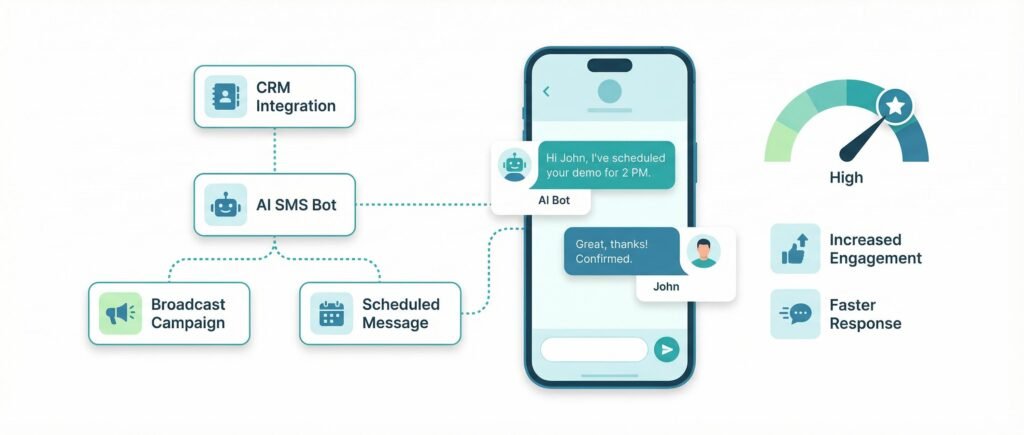
Method 4: Schedule WhatsApp Messages Using Business Automation Platforms
Many companies looking for how to schedule a message in WhatsApp use professional automation software.
Popular platforms include:
- WhatsApp Business API
- CRM Integrations
- Marketing Automation Platforms
- AI Chatbots
- WhatsApp Automation Software
These tools allow:
- Bulk scheduled campaigns
- Personalized messaging
- Lead nurturing
- Customer follow-ups
- Reminder sequences
- Marketing campaigns
This method is ideal for medium and large businesses.
Benefits of Scheduling WhatsApp Messages
Understanding how to schedule a message in WhatsApp provides numerous advantages.
Better Time Management
Prepare communications in advance.
Improved Customer Experience
Customers receive timely responses.
Higher Engagement
Scheduled messages often achieve better response rates.
Business Growth
Automation reduces manual work.
Better Team Coordination
Internal reminders keep everyone aligned.
Reduced Human Error
No forgotten messages.
Increased Productivity
Focus on strategy rather than repetitive tasks.
How to Schedule a Message in WhatsApp for Business Growth
If you own a business, learning how to schedule a message in WhatsApp can significantly improve customer communication. Timely messages create a professional impression and help maintain regular engagement with customers without requiring manual effort every day.
Businesses across industries use scheduled WhatsApp messages for:
- Appointment confirmations
- Follow-up messages
- Order updates
- Payment reminders
- Festival greetings
- Promotional offers
- Customer feedback requests
- Product launch announcements
- Event reminders
- Lead nurturing
Instead of sending every message manually, automation ensures that customers receive the right message at the right time.
Best Tools for How to Schedule a Message in WhatsApp
When searching how to schedule a message in WhatsApp, you’ll come across several tools. Choosing the right one depends on your needs.
1. SKEDit
One of the most popular Android apps for scheduling WhatsApp messages.
Best for:
- Personal use
- Birthday wishes
- Daily reminders
Pros
- Easy interface
- Free version available
- Supports multiple apps
Cons
- Requires permissions
- Some Android devices need manual confirmation
2. Apple Shortcuts
For iPhone users, Apple Shortcuts provides automation options.
Best for:
- iOS users
- Personal reminders
Pros
- Built into iPhone
- No third-party installation
Cons
- Limited automation
- May require user confirmation
3. WhatsApp Business API
If your business handles hundreds or thousands of customers, the WhatsApp Business API is one of the best solutions for how to schedule a message in WhatsApp.
Features include:
- Bulk messaging
- Customer segmentation
- Automated replies
- Campaign scheduling
- CRM integration
- Analytics
Ideal for medium and large businesses.
4. CRM Software
Many CRM platforms integrate directly with WhatsApp.
Examples include:
- Lead follow-ups
- Sales reminders
- Customer onboarding
- Renewal reminders
- Support ticket updates
This creates a seamless customer communication workflow.
Common Use Cases for Scheduling WhatsApp Messages
Understanding how to schedule a message in WhatsApp becomes even more valuable when you know where it can be applied.
Birthday Wishes
Never miss an important birthday again.
Anniversary Greetings
Build stronger personal and professional relationships.
Appointment Reminders
Doctors, salons, consultants, and service providers can reduce no-shows.
Payment Reminders
Send polite reminders before due dates.
Festival Greetings
Schedule Diwali, Holi, Christmas, New Year, or Eid wishes in advance.
Daily Team Updates
Managers can automate routine reminders for employees.
Promotional Campaigns
Inform customers about:
- Discounts
- Flash sales
- New arrivals
- Limited-time offers
Educational Reminders
Schools and coaching institutes can notify students about:
- Classes
- Exams
- Homework
- Parent meetings
Mistakes to Avoid While Learning How to Schedule a Message in WhatsApp
Many users make simple mistakes that reduce the effectiveness of scheduled messaging.
Sending Too Many Messages
Avoid overwhelming recipients with excessive messages.
Ignoring Time Zones
If your audience is international, always schedule messages according to their local time.
Forgetting to Proofread
Double-check spelling, grammar, links, and contact details before scheduling.
Sending Generic Messages
Personalized messages usually perform much better than generic ones.
Scheduling During Odd Hours
Avoid sending promotional messages late at night or very early in the morning.
Is Scheduling WhatsApp Messages Safe?
A common concern among users searching how to schedule a message in WhatsApp is safety.
The answer depends on the method you use.
Official WhatsApp Features
These are the safest option because they comply with WhatsApp’s policies.
Trusted Automation Platforms
Reputable WhatsApp Business API providers follow Meta’s guidelines and offer secure communication.
Third-Party Apps
Be cautious when granting permissions. Download apps only from trusted sources and review their privacy policies.
Tips to Use Scheduled WhatsApp Messages Effectively
To get the best results after learning how to schedule a message in WhatsApp, follow these practical tips:
- Write short and clear messages.
- Add the recipient’s name whenever possible.
- Include a clear call-to-action.
- Test your scheduled message before using it for customers.
- Keep your contact list updated.
- Avoid spammy language.
- Use professional formatting.
- Schedule messages during peak engagement hours.
- Track customer responses and optimize future campaigns.
How Scheduled WhatsApp Messages Improve Marketing
Businesses that understand how to schedule a message in WhatsApp often experience better marketing outcomes.
Improved Customer Engagement
Timely communication increases the chances of customers opening and responding to messages.
Better Lead Conversion
Following up with leads at the right time can significantly improve conversion rates.
Increased Customer Retention
Regular updates and reminders help keep customers connected with your brand.
Higher Productivity
Automation reduces repetitive tasks, allowing your team to focus on strategic activities.
Consistent Brand Communication
Scheduled messaging ensures your brand remains active and responsive, even outside business hours.
Who Should Learn How to Schedule a Message in WhatsApp?
This feature is useful for almost everyone, including:
- Business owners
- Digital marketers
- Freelancers
- Sales professionals
- Teachers
- Doctors
- Clinics
- Real estate agents
- Event planners
- Coaches
- Consultants
- Customer support teams
- E-commerce businesses
- Startups
- Educational institutes
Frequently Asked Questions (FAQs)
1. Can I schedule a message in WhatsApp without using any app?
No. Currently, the regular WhatsApp Messenger app does not offer a built-in feature to schedule messages. If you’re searching for how to schedule a message in WhatsApp, you’ll need to use Apple Shortcuts (on iPhone), trusted Android automation apps, or the WhatsApp Business API for advanced business needs.
2. Is scheduling WhatsApp messages free?
Yes, many methods are free. Apps like SKEDit (Android) and Apple Shortcuts (iPhone) offer free scheduling features. However, businesses using the WhatsApp Business API or CRM integrations may incur subscription or service costs.
3. Can I schedule messages in WhatsApp Business?
Yes, WhatsApp Business provides automation features such as Greeting Messages and Away Messages. For advanced scheduling, businesses typically use the WhatsApp Business API integrated with CRM or marketing automation tools.
4. Is scheduling WhatsApp messages safe?
Yes, if you use official WhatsApp features or trusted automation platforms. Always download third-party apps from reliable sources and review their permissions before granting access.
5. Can I schedule recurring WhatsApp messages?
Standard WhatsApp does not support recurring messages. However, many automation platforms and business tools allow daily, weekly, or monthly recurring schedules.
6. Can I schedule messages for groups?
Yes. Many scheduling tools support sending messages to both individual contacts and WhatsApp groups.
7. Why isn’t my scheduled message sending?
Common reasons include:
- Internet connection issues
- Required permissions not enabled
- Battery optimization restricting the app
- Device powered off
- Outdated version of the scheduling app
Expert Tips for Better WhatsApp Scheduling
Once you’ve learned how to schedule a message in WhatsApp, follow these best practices to maximize results:
- Keep messages concise and easy to read.
- Personalize messages with the recipient’s name whenever possible.
- Include a clear call-to-action (CTA).
- Schedule messages during peak engagement hours (9 AM–11 AM or 5 PM–8 PM, depending on your audience).
- Avoid sending multiple promotional messages in a short period.
- Test your scheduled messages before launching large campaigns.
- Use automation responsibly to avoid being marked as spam.
- Monitor delivery and response rates to refine your communication strategy.
Final Thoughts
Understanding how to schedule a message in WhatsApp is a valuable skill for both personal and professional communication. While the standard WhatsApp app doesn’t yet offer native message scheduling, there are several practical alternatives available for Android, iPhone, and businesses using the WhatsApp Business API.
Scheduled messaging helps you save time, improve consistency, reduce missed communications, and build stronger relationships with customers, clients, friends, and family. Whether you’re sending birthday wishes, appointment reminders, promotional campaigns, or customer follow-ups, scheduling messages ensures your communication is timely and organized.
As automation becomes increasingly important in digital communication, mastering how to schedule a message in WhatsApp can give you a competitive edge in productivity and customer engagement.
About the Author
Saurabh Kumar is a Digital Marketing Expert with 15+ years of experience helping businesses grow through innovative online marketing strategies. His expertise includes SEO, Website Development, WhatsApp Marketing, Paid Advertising, Social Media Marketing, Marketing Automation, and Online Reputation Management.
Through Digital Marketing India, he has helped businesses improve their online presence, generate quality leads, and increase revenue using result-driven digital solutions.

Why Choose Digital Marketing India?
If you’re looking to grow your business online, Digital Marketing India offers end-to-end digital solutions tailored to your goals.
Our Services
🌐 Website & App Development
- Business Website Development
- E-Commerce Website Development
- Custom Web Applications
- Android & iOS App Development
- Landing Pages
- Website Maintenance
🔍 SEO Services
- Local SEO
- On-Page SEO
- Off-Page SEO
- Technical SEO
- E-Commerce SEO
- Google Business Profile Optimization
- SEO Audits
📱 Social Media Marketing
- Facebook Marketing
- Instagram Marketing
- LinkedIn Marketing
- YouTube Marketing
- Content Strategy
- Social Media Management
🎯 Paid Advertising
- Google Ads
- Meta Ads
- YouTube Ads
- LinkedIn Ads
- Remarketing
- Lead Generation Campaigns
🤖 Automation Solutions
- WhatsApp Marketing
- WhatsApp Chatbot Development
- AI Chatbots
- CRM Integration
- Email Marketing Automation
- Marketing Automation
- Bulk SMS
- IVR Solutions
🎨 Creative Services
- Graphic Design
- Logo Design
- Brand Identity
- Banner Design
- Social Media Creatives
🎬 Video Production
- Video Editing
- Reels Editing
- Motion Graphics
- Corporate Videos
- Promotional Videos
✍️ Content Marketing
- SEO Content Writing
- Blog Writing
- Website Content
- Ad Copywriting
📊 Analytics & Reporting
- Google Analytics
- Conversion Tracking
- ROI Analysis
- Performance Reports
⭐ Online Reputation Management
- Google Review Management
- Brand Monitoring
- Online Reputation Building
Contact Information
Saurabh Kumar
15+ Years Experience in Digital Marketing
Digital Marketing India
📍 Official Address:
S15-00709, Vaidehi Niwas,
Bhairomunna Link Road,
Sahnewal, Ludhiana, Punjab – 141120
📞 Phone: +91 76966 77728