How to Get WhatsApp Business API
In today’s digital world, WhatsApp has become one of the most effective communication platforms for businesses of every size. If you’re searching for How to Get WhatsApp Business API, you’re making a smart move toward improving customer communication and business growth. The WhatsApp Business API is designed for businesses that want to handle customer conversations professionally, automate responses, and scale their support operations. Understanding How to Get WhatsApp Business API is essential for companies that receive a large number of customer inquiries every day.
Whether you run a startup, an eCommerce store, a healthcare clinic, a real estate agency, an educational institute, or a large enterprise, learning How to Get WhatsApp Business API can transform the way you interact with customers. Unlike the standard WhatsApp Business App, the API version supports multiple team members, AI-powered chatbots, CRM integration, marketing automation, and personalized customer engagement. These features make it an ideal solution for businesses looking to provide faster responses and a better customer experience.
If you’re wondering How to Get WhatsApp Business API, the process is simpler than many people think. It involves creating a Meta Business Account, verifying your business, registering a dedicated business phone number, and connecting with an official WhatsApp Business Solution Provider. Once your account is approved, you can integrate the API with your CRM, automate customer support, send order updates, appointment reminders, payment notifications, and even recover abandoned carts. Businesses that understand How to Get WhatsApp Business API often experience improved customer satisfaction, higher engagement, and increased sales.
This comprehensive guide explains How to Get WhatsApp Business API step by step, including eligibility requirements, verification, setup, pricing, benefits, and best practices. You’ll also discover common mistakes to avoid, industries that benefit the most, and practical tips for using the platform effectively. By the end of this guide, you’ll have a clear understanding of How to Get WhatsApp Business API and how it can help streamline communication, automate repetitive tasks, generate quality leads, and support long-term business growth in today’s competitive digital marketplace.
What is WhatsApp Business API?
Before understanding How to Get WhatsApp Business API, it’s important to know what it actually is.
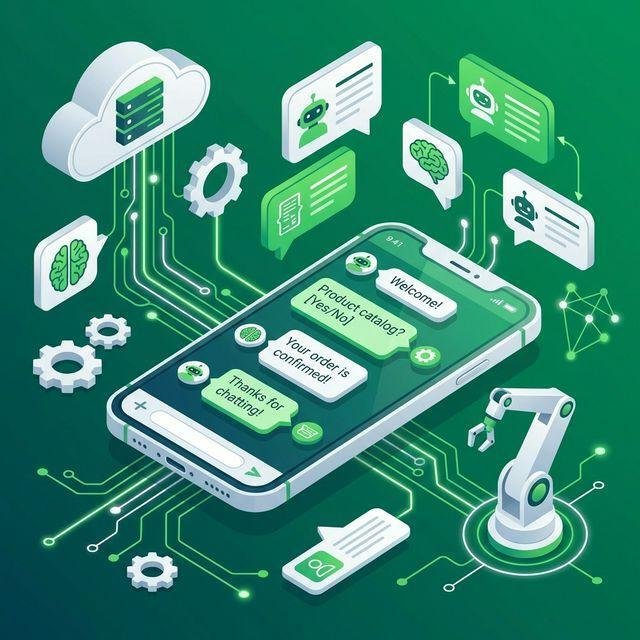
WhatsApp Business API is a communication solution developed by Meta that enables medium and large businesses to communicate with customers on WhatsApp using automation, chatbots, CRM systems, and multiple customer support agents.
Unlike the free WhatsApp Business App, the API does not have a standalone mobile interface. Instead, it works through business software or official WhatsApp Business Solution Providers (BSPs).
The API allows businesses to:
- Automate customer conversations
- Send notifications and alerts
- Confirm orders
- Share invoices
- Handle customer support
- Send appointment reminders
- Recover abandoned carts
- Integrate with CRM software
- Connect AI chatbots
- Manage multiple agents simultaneously
This makes it one of the most powerful customer engagement tools available today.
Why Businesses Need WhatsApp Business API
Many businesses begin their journey with the WhatsApp Business App because it is free, easy to use, and suitable for handling a small number of customer conversations. However, as a business grows, customer inquiries increase, and managing every message manually becomes time-consuming and inefficient. This is when business owners start searching for How to Get WhatsApp Business API to upgrade their communication system and improve customer experience.
Learning How to Get WhatsApp Business API also enables businesses to provide faster responses, reduce manual workload, and improve customer satisfaction. Whether you run an eCommerce store, healthcare clinic, educational institute, travel agency, or digital marketing company, the API helps streamline communication while maintaining a professional customer experience.
Businesses that know How to Get WhatsApp Business API can also use advanced features like marketing automation, lead nurturing, customer segmentation, and personalized messaging. These capabilities not only save time but also help increase engagement and conversions. As customer expectations continue to grow, upgrading from the standard app to the API has become a strategic decision for businesses aiming to scale efficiently.
If your business is expanding and you’re struggling to manage customer conversations manually, now is the perfect time to learn How to Get WhatsApp Business API and take advantage of a powerful communication solution that supports long-term business growth.
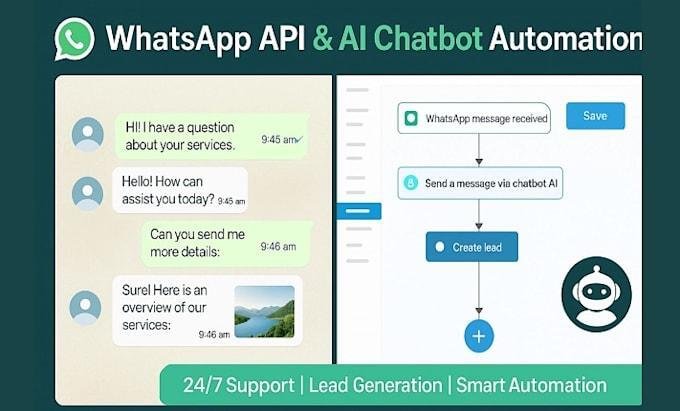
Here are some major reasons businesses switch to the WhatsApp Business API.
1. Multi-Agent Support
Several team members can respond to customers using one WhatsApp number.
2. Automation
Automate greetings, FAQs, follow-ups, reminders, and notifications.
3. CRM Integration
Connect WhatsApp with CRM platforms like HubSpot, Zoho CRM, Salesforce, and custom software.
4. AI Chatbots
Handle customer inquiries 24×7 without human intervention.
5. Broadcast Campaigns
Send promotional and utility messages to customers in compliance with Meta’s policies.
6. Better Customer Experience
Customers receive faster responses and personalized communication.
How to Get WhatsApp Business API: Step-by-Step Process
How to Get WhatsApp Business API
If you’re searching for How to Get WhatsApp Business API, the good news is that the process is much simpler than most businesses think. Whether you’re a startup, an eCommerce store, a healthcare clinic, an educational institute, or a growing enterprise, understanding How to Get WhatsApp Business API can help you improve customer communication and automate your business operations. By following the right process, you can get access to the WhatsApp Business API and start using advanced messaging features for your business.
The first step in How to Get WhatsApp Business API is creating a verified Meta Business Account. After that, you’ll need to verify your business details and register a dedicated business phone number. Once your business verification is complete, you can choose an official WhatsApp Business Solution Provider (BSP) to activate your API account. These providers help businesses with API setup, hosting, technical support, chatbot development, and CRM integration.
Another important step in How to Get WhatsApp Business API is configuring message templates and integrating the API with your CRM or business software. This allows you to automate customer support, send order confirmations, appointment reminders, payment notifications, and personalized marketing messages. Businesses can also integrate AI-powered chatbots to provide instant responses and improve customer satisfaction.
Before launching, it’s important to test your setup to ensure that message delivery, automation, and chatbot workflows function properly. Once everything is configured, your business can start using the WhatsApp Business API for lead generation, customer support, marketing campaigns, and business automation.
By following these simple steps, How to Get WhatsApp Business API becomes an easy and straightforward process. With the right setup and implementation, businesses can improve response times, increase customer engagement, automate repetitive tasks, and build stronger relationships with customers. Investing in the WhatsApp Business API is a smart decision for any business looking to scale communication and grow efficiently in today’s competitive digital world.
Step 1: Create a Meta Business Account
The first requirement is having a Meta Business Account.
Visit Meta Business Manager and create your business profile.
You’ll need:
- Business name
- Business email
- Website
- Business address
- Contact details
This is the foundation for accessing WhatsApp Business API.
Step 2: Verify Your Business
Business verification is one of the most important steps in How to Get WhatsApp Business API.
Meta asks businesses to verify their identity before granting access.
You’ll usually need:
- GST Certificate
- Business Registration
- Utility Bill
- Business License
- Official Website
Verification increases trust and unlocks advanced messaging capabilities.
Step 3: Choose an Official WhatsApp Business Solution Provider
Meta no longer requires businesses to host the API themselves.
Instead, most companies use official WhatsApp Business Solution Providers.
A BSP helps with:
- API setup
- Hosting
- Chatbot integration
- CRM integration
- Message templates
- Analytics
- Support
Choosing the right provider simplifies the entire process.
Step 4: Register Your Business Phone Number
Next, you’ll need a phone number.
Important points:
- It must not already be connected to a personal WhatsApp account.
- It should be dedicated to business communication.
- It should be capable of receiving OTP verification.
Many businesses prefer using their customer support number.
Step 5: Connect the API
After verification, the BSP connects your business with the WhatsApp Business Platform.
This process includes:
- API activation
- Authentication
- Account configuration
- Message setup
- Testing
Once complete, your API becomes operational.
Step 6: Configure Message Templates
Meta requires businesses to use approved templates for initiating conversations.
Common templates include:
- Order confirmation
- Payment reminder
- Appointment confirmation
- Delivery updates
- Welcome message
- Promotional offers
- Feedback request
Each template must be approved before use.
Step 7: Integrate CRM
One of the biggest advantages of How to Get WhatsApp Business API is CRM integration.
You can connect it with:
- Salesforce
- HubSpot
- Zoho CRM
- Microsoft Dynamics
- Freshsales
- Custom CRM
Benefits include:
- Automatic lead capture
- Customer history
- Personalized communication
- Better follow-ups
Step 8: Add Chatbots
Businesses handling hundreds of inquiries daily can automate conversations using AI chatbots.
Examples:
- Appointment booking
- Product recommendations
- Order tracking
- Frequently asked questions
- Lead qualification
This saves time while improving customer satisfaction.
Step 9: Test Everything
Before going live, test:
- OTP delivery
- Automated replies
- Chatbot flow
- CRM sync
- Notifications
- Message templates
Testing prevents customer-facing issues.
Step 10: Launch Your WhatsApp Marketing Strategy
Once everything is working properly, you can begin using WhatsApp Business API for:
- Customer Support
- Lead Generation
- Sales
- Marketing
- Appointment Booking
- Customer Retention
- Feedback Collection
This is where businesses start seeing real returns on their investment.

Who Can Use WhatsApp Business API?
Almost every industry can benefit.
Examples include:
- Healthcare
- Hospitals
- Clinics
- Dentists
- Gyms
- Real Estate
- Coaching Institutes
- Schools
- Colleges
- Restaurants
- Hotels
- Ecommerce Stores
- Automobile Dealers
- Insurance Companies
- Travel Agencies
- Event Companies
- Finance Companies
- Digital Marketing Agencies
- Beauty Salons
- Home Services
Businesses with high customer interaction gain the most value.
Documents Required for WhatsApp Business API
Before applying, keep these ready:
- Business Registration Certificate
- GST Certificate (if applicable)
- Business PAN
- Official Website
- Business Email
- Phone Number
- Company Address
- Facebook Business Manager Account
These documents help speed up the verification process.
Common Mistakes While Getting WhatsApp Business API
Avoid these mistakes:
- Using a personal WhatsApp number
- Not completing business verification
- Sending spam messages
- Ignoring Meta’s messaging policies
- Using unapproved templates
- Choosing an unreliable provider
Following best practices ensures a smooth approval process.
WhatsApp Business API Pricing
One of the most common questions businesses ask after learning How to Get WhatsApp Business API is about pricing.
The cost depends on several factors:
- Meta’s conversation/message charges
- Your Business Solution Provider (BSP)
- Number of conversations
- Automation features
- Chatbot requirements
- CRM integrations
Some providers charge only Meta conversation fees, while others offer monthly subscription plans that include additional features like analytics, automation, chatbot development, and customer support.
If your business sends a high volume of messages every month, choosing the right provider can significantly reduce your overall costs.
WhatsApp Business App vs WhatsApp Business API
Many people confuse the WhatsApp Business App with the WhatsApp Business API. Here’s a comparison to help you choose the right option.
| Feature | WhatsApp Business App | WhatsApp Business API |
|---|---|---|
| Best For | Small Businesses | Medium & Large Businesses |
| Multiple Users | ❌ No | ✅ Yes |
| Chatbots | ❌ No | ✅ Yes |
| CRM Integration | ❌ No | ✅ Yes |
| Automation | Limited | Advanced |
| Bulk Notifications | ❌ No | ✅ Yes |
| API Access | ❌ No | ✅ Yes |
| Team Collaboration | ❌ No | ✅ Yes |
| Analytics | Basic | Advanced |
| AI Integration | ❌ No | ✅ Yes |
If your business is growing and customer inquiries are increasing every day, the API version is the better long-term solution.
Benefits of WhatsApp Business API
Businesses across industries are rapidly adopting the WhatsApp Business API because it offers several advantages over traditional communication channels.
1. Better Customer Support
Customers receive quick responses without waiting on long phone calls or emails.
2. Higher Open Rates
WhatsApp messages generally achieve significantly higher open rates than email marketing campaigns, making it an effective communication channel.
3. Faster Lead Conversion
When customers receive instant replies, they are more likely to make purchasing decisions.
4. Automated Communication
Routine tasks like appointment reminders, order updates, and payment confirmations can be automated, saving valuable time.
5. Personalized Messaging
Businesses can send personalized messages based on customer preferences and purchase history.
6. Secure Communication
Since WhatsApp uses end-to-end encryption, customer conversations remain secure.
7. Improved Customer Satisfaction
Quick, personalized, and reliable communication creates a better overall customer experience.
Industries That Benefit the Most
Almost every business can benefit from learning How to Get WhatsApp Business API, but some industries see exceptional results.
Healthcare
- Appointment booking
- Patient reminders
- Prescription notifications
Real Estate
- Property inquiries
- Site visit scheduling
- Lead nurturing
E-commerce
- Order confirmations
- Shipping updates
- Cart recovery messages
Education
- Admission inquiries
- Student updates
- Course reminders
Restaurants
- Table reservations
- Food ordering
- Promotional offers
Travel Agencies
- Booking confirmations
- Travel updates
- Customer support
Financial Services
- Payment reminders
- Account notifications
- Customer assistance
Best Practices for Using WhatsApp Business API
Once you understand How to Get WhatsApp Business API, it’s equally important to use it effectively.
Get Customer Consent
Always obtain customer permission before sending promotional messages.
Respond Quickly
Fast responses improve customer trust and engagement.
Personalize Messages
Use customer names and relevant information to make conversations more meaningful.
Avoid Spam
Only send messages that provide value to customers.
Use Automation Wisely
Automate repetitive tasks while allowing customers to connect with human agents when needed.
Monitor Performance
Track message delivery, response rates, and customer satisfaction to improve your communication strategy.
Keep Templates Updated
Review and optimize your approved message templates regularly.
Common Challenges and Their Solutions
Challenge: Business Verification Delays
Solution: Ensure all business documents are accurate and match your registered business information.
Challenge: Message Template Rejections
Solution: Follow Meta’s template guidelines and avoid promotional language where not appropriate.
Challenge: Low Customer Response
Solution: Personalize messages and send them at suitable times.
Challenge: Managing High Chat Volumes
Solution: Use AI chatbots and automation to handle common queries efficiently.
Frequently Asked Questions (FAQs)
1. Is WhatsApp Business API free?
No. While setting up the API may be free with some providers, Meta charges businesses based on conversations or messages, and some providers charge additional platform fees.
2. Can I use my existing WhatsApp number?
Yes, provided the number is eligible and can be migrated according to Meta’s guidelines.
3. Is business verification mandatory?
For many businesses and advanced features, verification is recommended and may be required depending on your setup and use case.
4. Can small businesses use WhatsApp Business API?
Yes. Small businesses expecting growth or needing automation, CRM integration, or multiple agents can benefit from the API.
5. How long does approval take?
The timeline depends on document verification and provider processes. It can range from a few hours to several days.
6. Can I connect my CRM?
Yes. Most major CRM platforms and many custom CRMs can be integrated with the WhatsApp Business API.
7. Can I build AI chatbots?
Absolutely. One of the biggest advantages of the API is its support for AI-powered chatbots and automated workflows.
Final Thoughts
If your business communicates with customers regularly, investing in the WhatsApp Business API can significantly improve efficiency, customer satisfaction, and lead conversion.
By following the steps in this guide on How to Get WhatsApp Business API, you can set up a professional communication system that supports long-term business growth.

About the Author
Saurabh Kumar
15+ Years of Experience in Digital Marketing
Saurabh Kumar is a seasoned Digital Marketing Expert with over 15 years of experience helping businesses establish a powerful online presence and achieve sustainable growth. Throughout his career, he has partnered with startups, SMEs, and established brands across various industries, delivering customized digital marketing strategies that increase visibility, generate qualified leads, and improve business performance.
Need Help Getting WhatsApp Business API?
If you’re planning to implement WhatsApp Business API for your business, Digital Marketing India can help you with:
- WhatsApp Business API Setup
- Business Verification Assistance
- WhatsApp Chatbot Development
- AI Chatbot Integration
- CRM Integration
- Marketing Automation
- Lead Generation
- Website Development
- SEO Services
- Google Ads & Meta Ads
- Google Business Profile Optimization
Contact: +91 76966 77728
Office Address:
S15-00709, Vaidehi Niwas, Bhairomunna Link Road,
Sahnewal, Ludhiana, Punjab – 141120